Filters
Filters turn the general stream into your own feed: your bankroll, your venues, your sports, and nothing you can’t actually place.
When the feed has a few dozen arbs, most of them aren’t for you: no account on that venue, the wrong sport, the wrong size. Filters turn the general stream into your own feed. Open them with Filters on the Opportunities screen. They apply live.
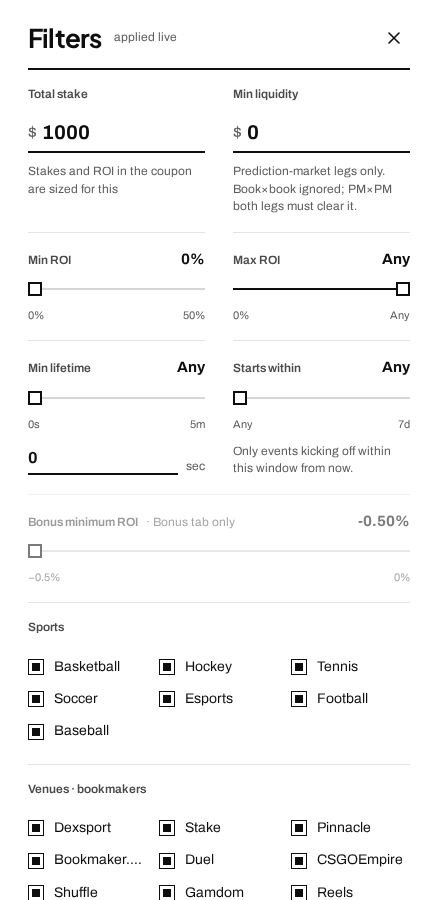
- 1 Total stake and Min liquidity. Your bankroll per arb, and the minimum money that has to be available on a prediction-market leg.
- 2 Min and Max ROI. The range of percentages you want to see.
- 3 Min lifetime and Starts within. How old an arb has to be, and how soon the event has to start.
- 4 Sports. Keep the ones whose markets you know.
- 5 Venues. Untick the ones where you don’t have an account.
Money
- Total stake is your bankroll for one arb. Every calculation is sized to it, so you see real amounts, not abstract percentages. Set $250 and the stake split in the slip is for $250.
- Min ROI is your threshold of interest. Set 1% and everything below disappears from the feed.
- Min liquidity cuts markets where there isn’t enough money at the right price and a big bet simply won’t go through. The higher the bar, the more reliable the arbs, but the fewer of them.
Liquidity has a detail people miss. Book versus book: the filter doesn’t touch it. Book versus exchange: it checks the exchange leg. Both legs on exchanges: both have to pass. A scanner that applies one threshold to everything either hides perfectly good bookmaker arbs or lets through exchange arbs with no real volume behind them.
Time
- Min lifetime hides arbs younger than the age you set. Brand-new ones sometimes live for an instant, and by the time you open the tabs it’s over. The threshold keeps the ones that have settled.
- Starts within shows only events starting inside the window. Say you don’t care about matches two or more days away: drag the slider and they stop showing. Handy when you don’t want money locked in a match five days out.
Protection from matches that might be cancelled
Hide PM legs at 50¢ / 51¢ (pre-match). Here’s why it exists. A price right in the middle almost always means the market doesn’t know whether the event will happen at all: there are rumours of a cancellation or a postponement. The trap is that on a cancellation the bookmaker refunds your bet, while the exchange may settle the position against you. Instead of a neat arb you get a loss out of nowhere.
The filter cuts those arbs in advance, and only in pre-match. Live arbs are not affected: there a price around 50¢ is normal.
Sports and venues
- Sports: basketball, hockey, tennis, soccer, esports (CS2, Dota 2, LoL, Valorant), American football, baseball. Keep the ones where you understand the markets and know where things are on the bookmaker’s site.
- Venues: every bookmaker and prediction market with a tick box. Untick the ones where you don’t have an account, so you don’t spend attention on arbs you can’t place anyway.
- Primary venue: pick one venue and only arbs that include it stay in the feed, with any ticked venue as the other leg. For when most of your bankroll sits on one bookmaker and that’s the one you want to turn over.